


Account
How to get Freja eID
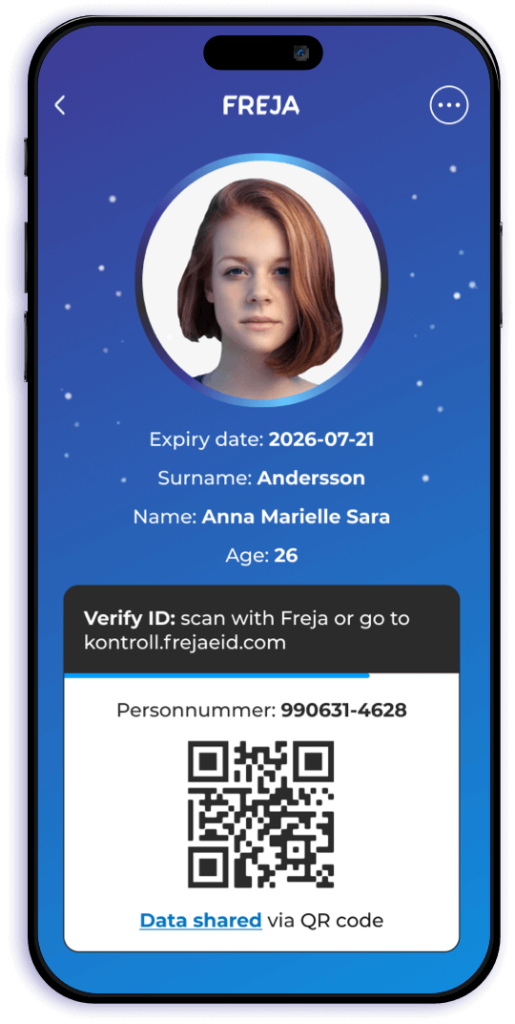
Freja eID is an e-ID and a digital ID card on your phone. You get it easily in the Freja app.
Once your Freja eID is active, you can easily verify your account on Hästannons.


What is Freja eID?
Freja eID is your e-ID and your ID card on your phone. You use it to log in to e-services and to identify yourself, for example at PostNord service points.
Safer on Hästannons
Verified members make Hästannons a safer place for everyone, and verification opens up more possibilities for you.
Verified profile
You appear as verified with Freja eID on your profile and your ads.
Safer deals
Buyers and sellers can see that the person they are dealing with is verified.
Sign contracts
You sign contracts with your identity, free for members.
Four steps in the Freja app
It is quick. Have your phone and your ID document ready.
Download Freja
Free on the App Store, Google Play or AppGallery.
Take an ID photo
Your face should be clearly visible, as in a regular ID photo.
Scan your ID document
Passport, national ID card, driving licence or Swedish Tax Agency ID card.
Wait for approval
Freja reviews the registration and lets you know in the app.
Verify your Hästannons account
Sign in, open My profile and choose Verify with Freja eID. On a phone, Freja opens. On a computer, scan the QR code with the app.
Verify with Freja eIDStep by step
Take an ID photo
Freja becomes your digital ID card. Your face should be clearly visible, as in an ordinary ID photo. Retake it until you are happy.
- Good light
- Face clearly visible
- A light background, preferably white
- Remove headwear
- Remove sunglasses
Choose an ID document
Passport or national ID card
The straightest path. If the security checks pass, you get Freja+ immediately.
Driving licence or Tax Agency ID card
Works for registration. Freja+ then needs one more step: add a passport or national ID, or visit an agent.
Freja stops accepting Swedish driving licences and Tax Agency ID cards on 21 December 2026.
Scan the passport
- Read the instruction in the app, make sure the room is bright, and tap Start. Allow the camera if the app asks.
- Open the passport on the page with the photo and personal details. Place it on a flat surface and keep it open. Fit it in the frame, and do not cover the photo or the text with your fingers.
- The chip is read when the phone touches the passport. Tap Start, place the phone on the closed passport and hold still until it finishes. If nothing happens, slide the phone slowly downward.
- Check that the details are right. Correct anything that is wrong.
- A short check, so it is you who is getting Freja.
Scan a national ID card
- Place the card in the frame and tap the button when you are ready to scan. Allow the camera if the app asks.
- Android: lay the card flat, tap Start, and put the top of the phone on the lower half of the card. Hold still. If nothing happens, slide the phone slowly upward.
- iPhone: the same placement. When the read starts, do not move anything until it finishes.
- Check the details and complete the short check at the end.
Driving licence or Tax Agency ID card
- Place the card in the frame and scan it.
- Then type in the details from the document yourself.
- Hold the document under your chin so both it and your face are visible. The frames on the screen show how. It takes a few seconds.
Wait for Freja
Freja reviews applications on weekdays between 08:00 and 22:00 Swedish time. Weekends are slower. You get a notification in the app when it is done.
Good to know
Freja+
- A passport or national ID card, if the checks pass.
- A driving licence or Tax Agency ID card, plus one more biometric document.
- A driving licence or Tax Agency ID card, and a visit to a Freja agent.
To skip the visit, tap Freja+ on the home screen and add a passport or national ID.
Bring your phone and the same document you registered with. The agent scans a QR code that exists only on the Freja+ card in the app. It is not the code on the digital ID card. Freja often describes an ATG counter: open the code, ask them to scan it, and show the document.
After the visit it takes three hours before the level applies. You get a message when it is done. Until then, Freja works as usual.
If Freja+ is not on the home screen, it is under More, Manage account, Freja+.
If you did not get Freja+ even with a passport or national ID, the check did not go all the way. The agent is the path that remains.
Swedish citizen living abroad
Use your Swedish passport. If you have lived outside Sweden for more than five years, you may have been deregistered. Freja+ can then wait until you are registered again.
Not a Swedish citizen
Without a Swedish personal identity number, use a biometric passport from a country on Freja's list. With a personal identity number, register with a Swedish ID document, such as a Tax Agency ID card or driving licence.
Protected identity
Use a Swedish passport. Freja does not share your address, or that your identity is protected. Other information is shared only when you approve it in the app, each time.
Countries, agents and more detail are on Freja's registration page.